The idea
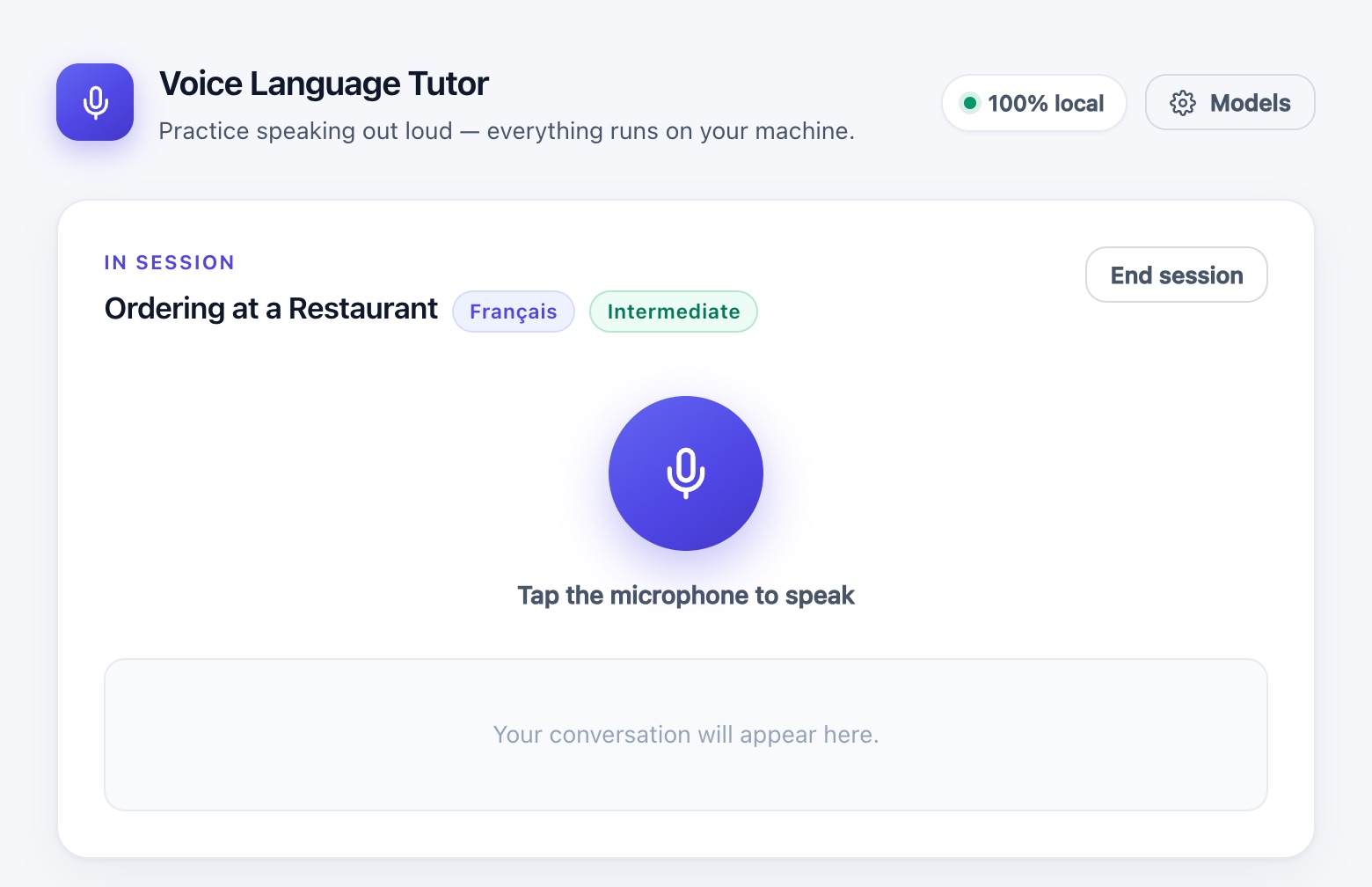
Speaking is the hardest part of a language to practice alone. A human partner means scheduling and often paying; a cloud voice assistant means a subscription and sending your voice to someone else's servers. I wanted something in between: a conversation partner that's always available, plays a role (a waiter, a recruiter, a neighbour), adapts to my level, and runs entirely on my own hardware.
The constraint I set from day one: zero calls to external AI services at runtime. The only network traffic is the one-time model download. After that, the app works offline.
Stack & building blocks
- FastAPI (Python): orchestrates each turn, keeps sessions in memory and serves the frontend
- faster-whisper: local speech-to-text on CPU in
int8, fromtinytolarge-v3 - Ollama: serves the conversational LLM in its own container (
llama3.2:1bby default) - Piper: fast neural text-to-speech, one voice per language, downloaded on first use
- Vanilla JS: microphone capture with
MediaRecorder, no framework, no build step - YAML + Pydantic: scenarios are config files validated at startup
- Docker Compose: the whole stack starts with a single
docker compose up
Architecture: two containers, one pipeline
I deliberately kept the topology small. Whisper and Piper are light enough to run in-process inside the FastAPI container; the LLM is heavier and Ollama already ships as a server, so it gets its own container. The two talk over a private Compose network.
- Browser Record MediaRecorder, webm/opus
- Backend Transcribe faster-whisper
- Ollama Reply /api/chat
- Backend Speak Piper, WAV
- Browser Play back + live transcript
services:
  backend:
    build:
      context: ./backend
    ports:
      - "8000:8000"
    volumes:
      - ./frontend:/app/frontend:ro
      - ./data:/app/data
      - piper-voices:/app/voices
      - whisper-cache:/root/.cache/huggingface
    depends_on:
      ollama:
        condition: service_healthy

  ollama:
    image: ollama/ollama:latest
    volumes:
      - ollama-models:/root/.ollama
The three named volumes matter: without them, every container recreate re-downloaded the Whisper model and Piper voices, adding a good 20 seconds before the first turn.
Push-to-talk rather than live streaming was a conscious MVP trade-off: record a turn, send it, get the answer. No voice activity detection, no barge-in, and a much simpler client. On the backend, a whole turn fits in one function:
def run_turn(session_id, audio_bytes, filename=None):
    session = get_session(session_id)
    scenario = get_scenario(session.scenario_id)

    user_text = transcribe(audio_bytes, filename=filename,
                           language=session.language)

    messages = _compose_messages(scenario, session.history, user_text,
                                 session.language, session.difficulty)
    ai_text = generate_reply(messages)

    audio_reply = synthesize(ai_text, language=session.language)

    # history only grows once every stage has succeeded
    session.history.append({"user_text": user_text, "ai_text": ai_text})
    return TurnResult(user_text, ai_text, audio_reply)
Each stage raises its own exception type
(TranscriptionError, LLMError,
SynthesisError), which the API turns into a prefixed
message. The frontend maps those prefixes to friendly messages
(“The AI isn't responding right now”) instead of showing a raw Ollama
error. The response is plain JSON with the audio as base64, so the
browser only needs a fetch() and a data: URI
to play it.
Scenarios, languages and levels
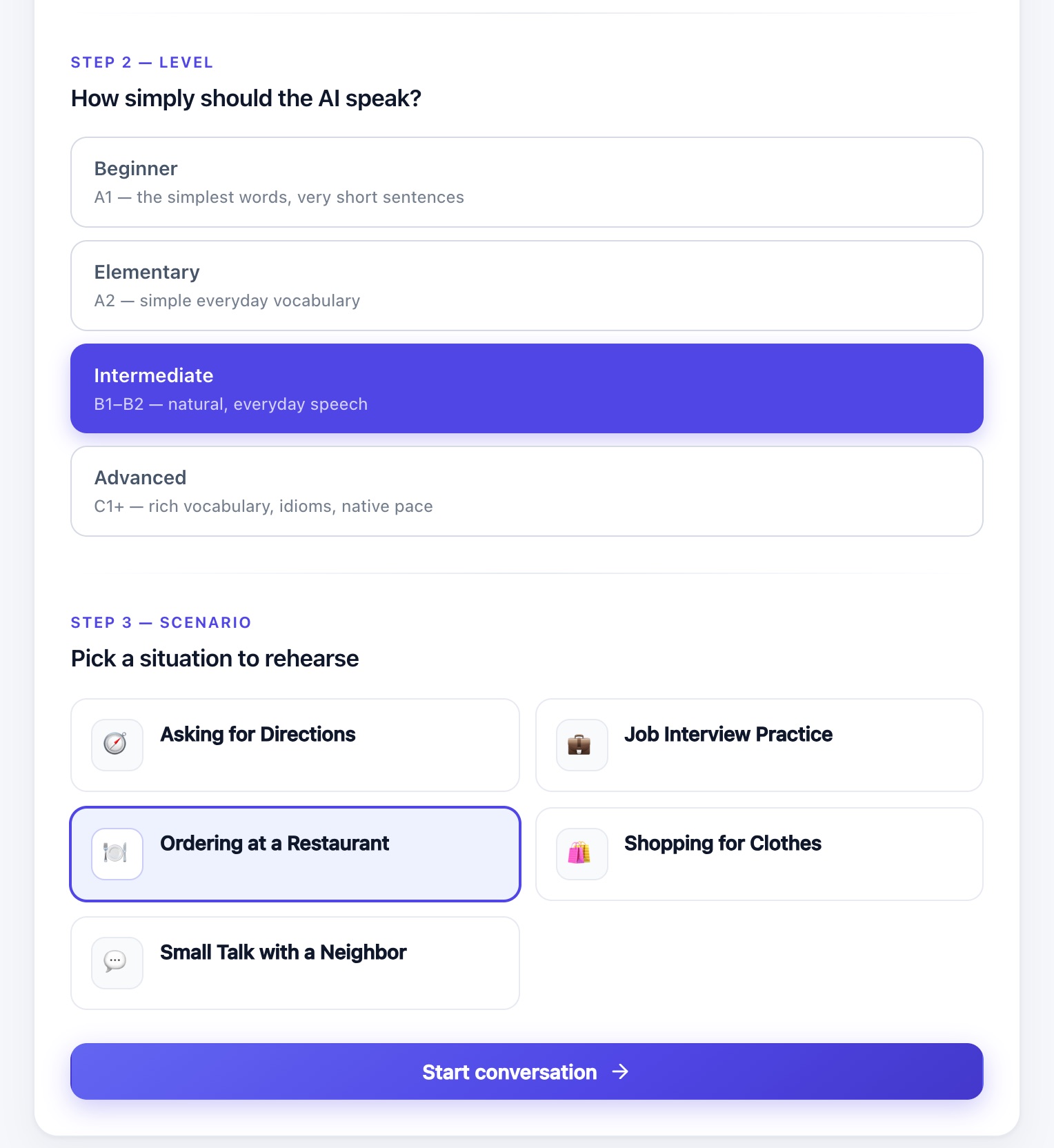
A scenario is just a YAML file: a persona, a goal, and that's it. Adding a new situation to rehearse doesn't touch the pipeline code.
id: restaurant
title: Ordering at a Restaurant
persona_prompt: >
  You are a friendly, attentive waiter at a mid-range restaurant. Greet the
  guest warmly, recommend a starter and a main course if they seem unsure,
  and ask sensible follow-up questions (cooking preference, allergies,
  drink choice). Stay in character as the waiter throughout.
goal: >
  The user successfully orders a starter, a main course, and a drink.
The practice language is picked on the main menu, and it drives three things that have to change together: the LLM instructions, the Piper voice (voices are language-specific) and the language hint given to Whisper. That last one matters more than it seems: on short or accented clips, Whisper's auto-detection sometimes guessed wrong and returned text in another language entirely. That's exactly the situation of someone practicing a language they don't speak natively. Pinning the language fixed it.
Levels that actually change how the AI speaks
Scenarios originally had a difficulty field. Except it
only ever displayed a badge on a card: it never reached the model.
The level is now the user's choice for the session, and each one
injects a concrete instruction into the system prompt:
"beginner": Difficulty(
    "beginner",
    "Beginner",
    "A1 — the simplest words, very short sentences",
    "The user is a beginner. Use only the most common everyday words and "
    "very short sentences of roughly five to eight words. Stay in the "
    "present tense almost all the time. Do not use idioms, slang, phrasal "
    "verbs or subordinate clauses.",
),
The difference is real, even with the same 1B model. Same scenario, same audio: at Beginner the waiter says “Hello. Welcome. What can I get for you?” (8 words); at Advanced, it's a 64-word reply with “establishment”, “complimentary beverage” and “peruse our menu”.
The bug where the AI played both parts
My favourite bug. In Spanish, with a small Gemma model, the AI would answer… then keep going, inventing my next line and its own reply to it:
¿Vives cerca de aquí? User: Sí, tengo una casa cerca... Assistant: Soy de Madrid.
The cause was the prompt. The history was flattened into a
hand-written User: … Assistant: … transcript and sent to
Ollama's /api/generate, a completion endpoint.
The model was simply continuing the pattern it had been shown:
nothing in a raw transcript says where its turn ends.
The fix: switch to /api/chat with a list of role-tagged
messages. The chat endpoint applies the model's own conversation
template, which provides the end-of-turn token.
messages = [{"role": "system", "content": "\n".join(system)}]
for turn in history:
    messages.append({"role": "user", "content": turn["user_text"]})
    messages.append({"role": "assistant", "content": turn["ai_text"]})
messages.append({"role": "user", "content": user_text})
And because small quantised models sometimes blow past that token
anyway, a cheap guard truncates the reply at the first leaked
User: or Assistant: marker. It costs nothing
when the model behaves. Result: three Spanish turns in a row with
history, zero leakage.
Choosing models from the UI
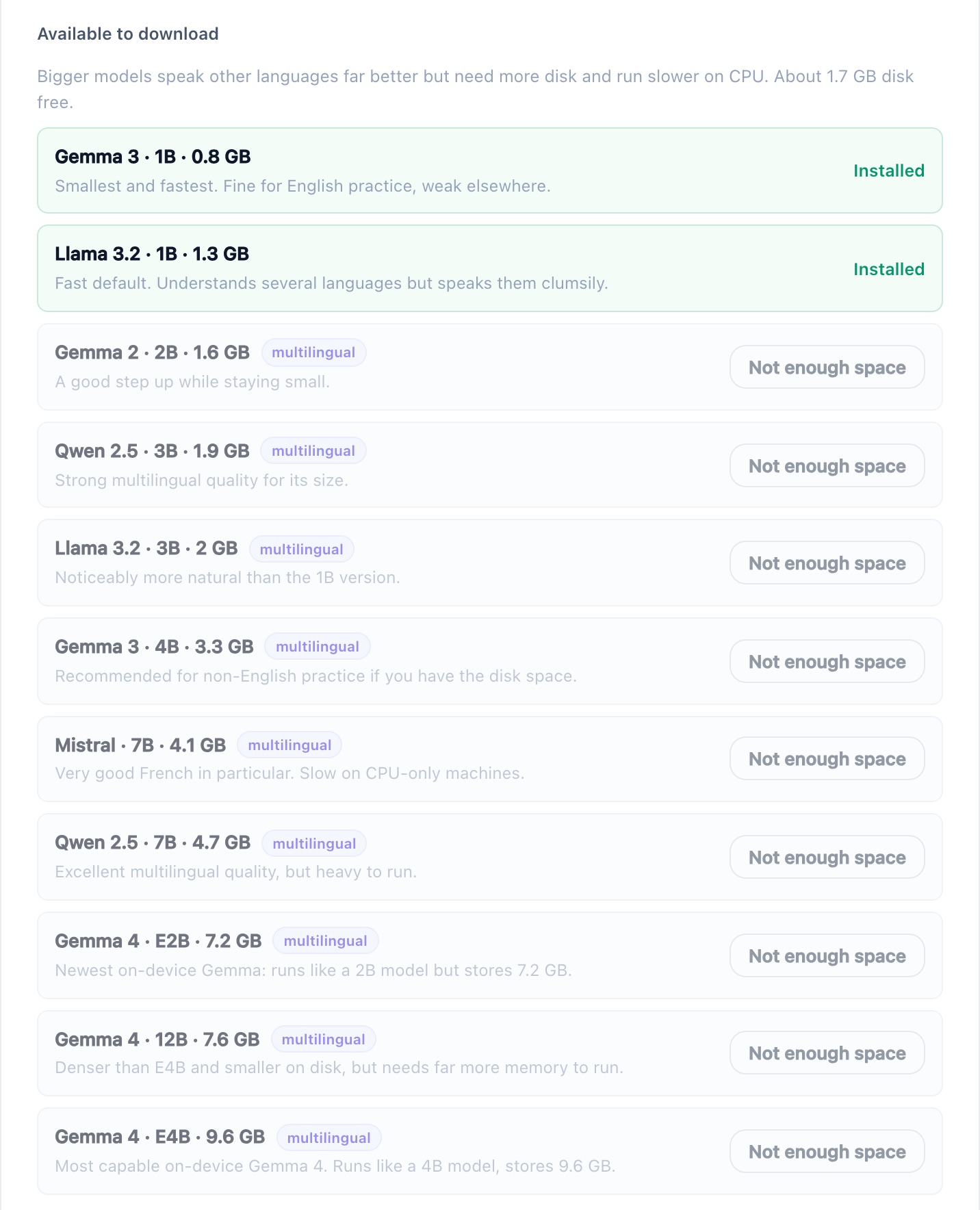
A Models panel shows the three engines in use and
lets you change the Whisper size, the Ollama model and the voice for
each language. Changes are persisted to data/settings.json
(a bind mount), so they survive a restart. It also offers a curated
catalogue of 11 models, from gemma3:1b (0.8 GB) up to
gemma4:e4b (9.6 GB), pulled in the background with live
progress: no terminal needed.
A hidden detail: switching models at runtime broke a small
assumption. Whisper and Piper were loaded through
lru_cache(maxsize=1), which would have kept serving the
old model after a change: the setting looks saved, but
nothing actually changes. Caches are now keyed per model and per
voice.
Installed doesn't mean runnable
Offering multi-GB downloads from the UI means making sure they can
actually succeed. The first free-space check read
shutil.disk_usage("/") from inside the container. Result:
46.3 GB free reported, while the Mac running Docker
had 3.0 GB left. That's the Docker VM's virtual disk
talking, not the real one. It would happily have green-lit a 7.5 GB
pull doomed to die halfway, which is exactly how the project's very
first docker compose up failed, on a Mac at 99% disk
usage.
def _disk_free_gb():
    # "/" is the Docker VM's virtual disk; the bind-mounted data dir
    # passes through to the host filesystem. Both constrain a pull.
    free_bytes = []
    for path in ("/", os.environ.get("APP_DATA_DIR", "/app/data")):
        try:
            free_bytes.append(shutil.disk_usage(path).free)
        except OSError:
            continue
    if not free_bytes:
        return None
    return round(min(free_bytes) / 1e9, 1)
Then came the second trap. gemma4:e2b downloaded fine
(7.2 GB)… and got killed as soon as Ollama loaded it:
llama-server process has terminated: signal: killed.
The OOM killer, because the Docker VM only had 8.1 GB of RAM. The
panel now reads /proc/meminfo and requires both limits
before enabling a download: roughly the model size + 0.5 GB of disk,
and the model size + 1.5 GB of RAM. An installed model that won't fit
in memory is flagged too big for RAM instead of failing
mid-conversation.
One last counter-intuitive detail, about Gemma 4's “E” variants:
E2B/E4B refer to the parameters actually
used at inference, not the download size. gemma4:e4b
weighs 9.6 GB, more than the denser gemma4:12b
at 7.6 GB, because Per-Layer Embeddings inflate the download while
keeping the memory footprint low. So the catalogue sizes are measured
from the registry manifests, never guessed from the name.
Microphones, browsers and a very human bug
Recording audio in the browser looks trivial until each browser picks
its own container format by default. The recorder now explicitly
picks the first supported format (webm/opus, then
ogg/opus, then mp4), the file extension is
passed down to Whisper's decoder as a hint, and a recording under
2 KB is rejected client-side with a clear message about the
microphone.
The funny part: the “it doesn't record my voice” bug that triggered all this turned out to be the wrong microphone selected as input, plus a stale cached copy of the JS. The defensive fixes stayed anyway: the size check would have pointed at the bad mic much faster than a silently wrong transcript.
Planned like a real project
Even for a side project, I started with a short technical spec
(goals, non-goals, requirements, risks) using the BMAD method's
Quick Flow track, broken down into 13 stories across 5 epics, then
ordered into waves so that stories touching disjoint files could move
forward in parallel. Every trade-off went into a
decision-log.md next to the code: why a 1B model by
default, why push-to-talk, which assumption was overturned and when.
Multi-language support, for instance, reversed the initial “one language to start” assumption; the original entry is marked as superseded rather than deleted. When you come back to a project later, that log is worth more than the commit history. On the quality side, 81 pytest tests cover scenario loading, prompt composition, API contracts and the pipeline, including a few that push a real audio clip through the STT → LLM → TTS chain.
What I liked about building this
- A full listen → think → speak loop runs on a laptop CPU, with no GPU and no cloud.
- Most bugs weren't in the models but around them: prompt format, caches, disk and memory limits, browser audio formats.
- Keeping scenarios, languages and levels as data turned each new feature into a config change rather than a pipeline change.
- Checking every feature for real (an actual French session, an actual model pull, a restart to test persistence) caught issues that unit tests alone would have missed.
Limits & what's next
The default llama3.2:1b is fast, but its French or
Spanish is clumsy: for serious practice outside English, a 3–4B
multilingual model is the minimum. Docker on a Mac can't reach the
GPU, so everything runs on CPU: the spec targets 5 to 8 seconds per
turn, a rehearsal pace rather than a fluid conversation.
Next steps: streaming so the voice starts before the whole reply is generated, real-time conversation with voice activity detection instead of push-to-talk, gentle corrections of the user's mistakes at the end of a session, and an optional native Ollama mode to use Metal acceleration on Apple Silicon.
Code & questions
The code is public on GitHub. Happy to discuss the trade-offs or help you run it at home.